KB Crates

KB PAGINATOR / WHMCS ADDON

More answers. Less scrolling.

Add the page controls your WHMCS knowledgebase needs. KB Paginator turns long category lists into manageable pages—and it’s free.

Available now · Version 1.0.5 · Free to download

Enjoy the addon? An optional $4.95 contribution helps support development and updates.

ONE PAGE AT A TIME
Keep the next answer within reach.
KNOWLEDGEBASE
Getting started

Getting started with your hosting account

How to sign in to cPanel

Setting up your first email address

Showing 1–20 of 86 articles

1
2
3
Next

Illustrative category view · Sample titles and counts

10 · 20 · 25 · 50

Articles per page

Top, bottom, or both

Page controls where you want them

One enable switch

Manage pagination from the addon

A MUCH-NEEDED ADDITION TO YOUR KNOWLEDGEBASE

The pagination your knowledgebase is missing.

Standard WHMCS knowledgebase category lists lack built-in page controls. KB Paginator adds them, giving your visitors a clearer way through growing article collections.

01

Set the right page size

Choose 10, 20, 25, or 50 articles per page. Page controls appear when a category has more articles than the selected limit.

02

Make browsing easier

Place navigation above the article list, below it, or in both places so visitors can move through larger categories.

03

Show their place in the list

Display an optional article range so visitors can see how many articles they are viewing and how many are in the category.

INSIDE KB PAGINATOR

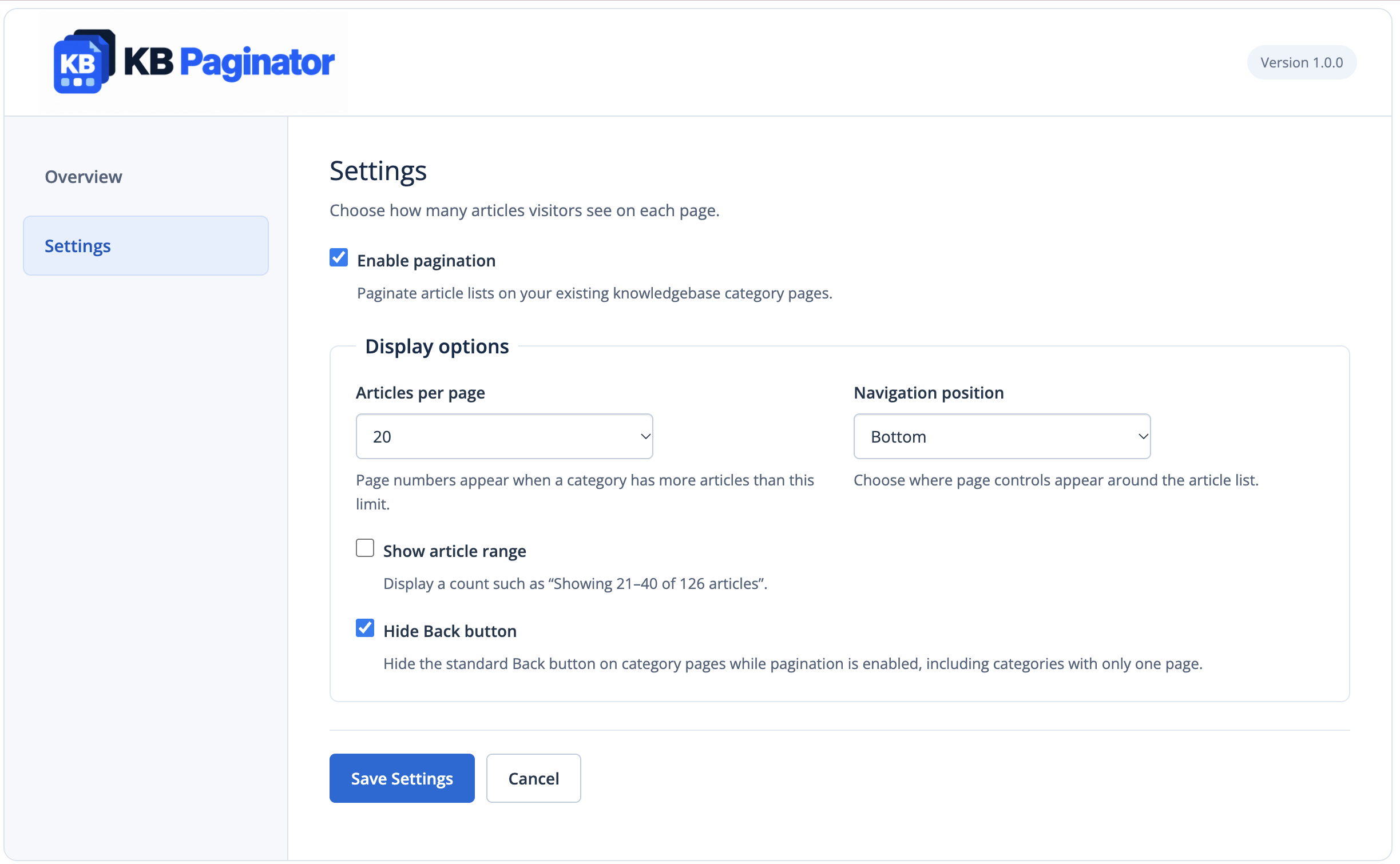
Simple settings. A clearer knowledgebase.

Enable pagination, choose your article limit, and decide where the controls appear. Everything stays together in the addon’s Settings screen.

KB Paginator 1.0.0 · Pagination settings in the WHMCS addon panel.

FROM SETUP TO THE NEXT PAGE

A straightforward setup.

1

Activate the addon

Upload KB Paginator to WHMCS, activate it, and assign administrator access.

2

Choose your settings

Open Addons → KB Paginator and set the article limit, navigation position, and range display.

3

Browse your knowledgebase

Open a category with more articles than your chosen limit and move through its pages.

AVAILABLE NOW

Free to use. Easy to support.

A useful addition to your WHMCS knowledgebase should be easy to try. Download KB Paginator free, with an optional way to support what comes next.

THE COMPLETE ADDON

KB Paginator

Free

Download the complete addon and add pagination to your WHMCS knowledgebase at no cost.

Configurable article limits
Flexible navigation placement
Optional article range display

No contribution required.

ENTIRELY OPTIONAL

Support development

$4.95

Like what we’re building? Make a one-time contribution toward development, improvements, and future updates.

The same free addon.
No extra features to unlock.
A simple way to support the work.

One-time contribution · No subscription

THE ESSENTIALS

A few things to know.

Do I need KB Crates to use it?

KB Paginator is a separate WHMCS addon. It works with your existing knowledgebase and does not require KB Crates content packs.

Does it change my articles?

It changes how category lists are browsed. It does not create, rewrite, or delete your knowledgebase articles.

Do I need to edit my theme?

KB Paginator connects recognized knowledgebase and category links automatically. Check custom themes and routing with your installation.

Do I have to contribute to use it?

No. KB Paginator 1.0.0 is free to download and use. The optional one-time $4.95 contribution supports development and future updates; it does not unlock additional features.

FREE. AVAILABLE NOW.

A better next page starts here.

KB Paginator · WHMCS addon · Version 1.0.5

Free to use. Optional $4.95 support for development and updates.